The Complete 2026 Guide to Using PayPal for Your Business
For many people across the Caribbean, PayPal is still understood in the simplest possible way: someone sends you money, the money arrives in PayPal, and then you figure out how to get it out.
That is only one part of what PayPal can actually do.
PayPal can sit at the centre of how a freelancer, consultant, creator, agency, small business or e-commerce company gets paid online. It can be used to invoice clients, create payment links, accept payments through a website, process eligible recurring payments and connect your business to customers outside your local banking system.
If you are building a business from Trinidad & Tobago, Jamaica, Barbados, Guyana, the Eastern Caribbean or elsewhere in the region, your opportunities are not limited to customers who can pay you through your domestic banking infrastructure.
Your client might be in Toronto.
Your customer might be in New York.
Your consulting client could be in London.
Someone might discover your product through social media, visit your website and pay you from the other side of the world.
The question is not simply:
Can I use PayPal in the Caribbean?
The better questions are:
How can I use PayPal as part of the payment infrastructure for my business?
How do I receive money properly?
Which PayPal payment method should I use?
How do I manage fees and currencies?
And once the money arrives, how do I actually access and use it from the Caribbean?
That is what this guide is designed to answer.
What You Will Learn in This Guide
In this guide, we will cover:
- How to set up your PayPal account correctly
- The difference between a Personal and Business account
- How to receive international payments
- How to send professional PayPal invoices
- How PayPal Payment Links work
- How to accept payments through your website
- How recurring payments and subscriptions can work where supported
- How PayPal fees are structured
- How currency conversion works
- How to connect cards and financial accounts
- The difference between receiving money and withdrawing money
- How PayPal functionality can differ across Caribbean countries
- How I personally use Sendana, Wise, Charles Schwab and Wam alongside PayPal
- How to decide which payment setup makes the most sense for your business
The goal is not to turn you into a PayPal technician.
The goal is to help you understand how PayPal can fit into a wider digital-payment system so you can make better decisions about how you get paid, how you move money and how you build a financial setup that supports a global business.
PayPal Is One Part of the Bigger Picture
PayPal should not be viewed in isolation.
Getting paid is only one stage of the process.
A complete digital-payment system can involve several different steps:
Customer or client → PayPal → financial account → spending, transferring, converting or investing
Different tools can play different roles at different stages.
PayPal may be the payment engine.
A separate financial platform may help you access USD.
Another account may help you hold or move money.
Another service may help you convert local currency into international currency.
Understanding those roles is one of the most important themes throughout this guide.
Updated: September 2026
Focus: Caribbean users and businesses
Includes personally tested workflows
PayPal Is More Than a Way to Receive Money
Most Caribbean users are only using a fraction of what PayPal can do.
For many people, PayPal is still treated like a digital wallet: someone sends you money, the balance appears in your account, and then you try to figure out how to withdraw it.
But PayPal can play a much bigger role in your business.
It can operate as a payment engine between your business and your customers. That means it can help you collect money, send professional payment requests, accept payments through your website, support eligible recurring billing and connect your business to customers who may be thousands of miles away.
For a Caribbean entrepreneur, that is important because your business does not have to be limited by the payment infrastructure available in your home country.
You may live in Trinidad & Tobago, Jamaica, Barbados or Guyana while working with clients in the United States, Canada, the United Kingdom or elsewhere. PayPal can help create the payment bridge between you and those customers.
You Can Use PayPal To:
- Receive payments from customers and clients
- Send professional invoices and track whether they have been paid
- Create Payment Links that can be shared through email, WhatsApp, social media or your website
- Accept payments through your website or online store
- Run eligible recurring payments and subscriptions for memberships, retainers and recurring services
- Pay businesses and online services using PayPal and eligible connected funding methods
The important shift is to stop thinking of PayPal only as somewhere money lands.
Think of it as part of the payment infrastructure behind your business.
Why PayPal Still Matters in 2026
PayPal is not new, and that is part of its advantage.
By the second quarter of 2026, PayPal reported approximately 439 million active accounts. In 2025, the platform processed roughly US$1.79 trillion in total payment volume, and PayPal continues to operate across 200+ countries and regions.
Its global country and currency directory currently lists support for 25 currencies.
Those numbers matter less because they are impressive and more because they show how widely established the platform has become.
For a Caribbean entrepreneur, the real value is much simpler:
Your customer does not need to understand Caribbean banking.
They do not need to know which local bank you use.
They do not need to understand how your domestic payment infrastructure works.
They simply need a payment option they recognize and know how to use.
That is one of the most useful roles PayPal can play: sitting between your Caribbean business and an international customer, making it easier for that customer to pay you.
Should You Use a Personal or Business PayPal Account?
PayPal offers both Personal and Business accounts, and the right choice depends on how you plan to use the platform.
Both account types can be used to send and receive money, but they are designed around different types of activity.
Personal PayPal Accounts
A Personal account is best suited to people who primarily use PayPal for personal transactions.
That can include:
- Shopping online
- Sending money
- Paying businesses and services
- Receiving eligible personal payments
- Occasional casual selling
If you are mainly using PayPal as a consumer rather than as part of an ongoing business, a Personal account may be enough.
PayPal Business Accounts
A Business account is designed for people and organizations using PayPal commercially.
That includes:
- Freelancers
- Consultants
- Creators
- Agencies
- Online sellers
- E-commerce businesses
- Small businesses
- Companies accepting customer payments
A Business account gives eligible users access to PayPal’s business-focused payment tools, including features such as invoicing, website checkout, Payment Links and other merchant functionality.
It also allows you to operate using your business or company information rather than treating every transaction as a purely personal payment.
Which One Should You Choose?
If you are reading this guide because you want to earn money online, work with international clients, sell products or services, or build a business that accepts digital payments, I would generally start by looking at a PayPal Business account.
That does not mean a Business account is mandatory for every person receiving money through PayPal.
It simply means that the Business account is better aligned with the commercial use cases we will be covering throughout this guide.
For the rest of this resource, I will primarily be showing PayPal from the perspective of someone using it as part of a business.
Create or access your PayPal account → PayPal
Setting Up Your PayPal Account
Setting up PayPal properly matters because your account country, identity details, business information and security settings can all affect which features are available to you later.
Take the time to get the foundation right from the beginning.
1. Choose the Correct Country
When creating your PayPal account, select the country where you actually live and operate.
This is important because PayPal features can vary by country. Account availability, receiving capabilities, withdrawal options, supported financial accounts and other features are not identical everywhere.
Your PayPal account country also cannot simply be changed later as if it were a normal profile setting.
Do not create an account in another country simply because you want access to different features.
2. Create Your Account
Start by creating your PayPal account using your:
- Email address
- Mobile number
- Password
Use an email address you actively monitor because PayPal will use it for account notifications, payment activity, security alerts and other important communication.
3. Complete Your Information
PayPal will ask for information about you and, for Business accounts, information about your business.
Depending on your account type and market, this can include:
- Your legal name
- Residential address
- Phone number
- Date of birth
- Business name
- Business address
- Business type
- Description of what your business does
Make sure the information you provide is accurate and matches your official documents and financial accounts where appropriate.
Mismatched names or incorrect information can create problems later when PayPal asks you to verify your identity or when you begin connecting financial accounts.
4. Complete PayPal Verification
PayPal may ask you to verify your identity, business information or other account details.
The exact requirements can vary depending on your country, account type and activity.
You may be asked to provide documents or complete additional verification steps before certain features become fully available.
If PayPal requests verification, complete it as early as possible rather than waiting until you are trying to receive or move an important payment.
5. Secure Your Account
Your PayPal account is connected to your money, so security should be treated seriously.
Use a strong, unique password and enable the security options available to your account.
Where available, that can include:
- Two-factor authentication
- Passkeys
- Security alerts
- Trusted-device management
Also make sure the email account connected to PayPal is properly secured.
6. Complete Your Business Profile
If you are using a PayPal Business account, take the time to complete your business information properly.
Review details such as:
- Business name
- Customer-facing business information
- Business contact details
- Website, where applicable
- Business description
- Customer-service information
Remember that some of this information can appear during the customer’s payment experience, on invoices or in transaction records.
Make sure customers can clearly recognize who they are paying.
7. Review Your Currencies and Account Settings
Once the account is established, spend some time reviewing your PayPal settings.
Pay particular attention to:
- Currencies
- Payment preferences
- Business information
- Security settings
- Notifications
- Banks and cards
- Available payment tools
You do not need to configure every PayPal feature immediately.
The goal is to understand what is available inside your account before you begin building your payment workflow around it.
Important: PayPal features, withdrawal options and financial-account compatibility can differ depending on your country.
How Money Actually Moves Through PayPal
One of the biggest sources of confusion with PayPal is treating every movement of money as if it were the same thing.
It is not.
Paying with PayPal, receiving money into PayPal and moving money out of PayPal are three separate processes.
Understanding that distinction will make the rest of this guide much easier to follow.
Paying with PayPal
Your card or bank → PayPal → merchant
When you use PayPal to buy something, PayPal can act as the payment layer between your funding source and the business you are paying.
Your funding source may be a linked debit card, credit card or eligible bank account.
PayPal processes the payment and sends the money to the merchant without requiring you to hand your card or bank details directly to that business.
This is about funding a payment.
Getting Paid
Customer → PayPal → your PayPal balance
When someone pays you, the direction is different.
The customer sends the payment through PayPal, and the money appears in your PayPal account.
That payment could come from:
- A PayPal invoice
- A Payment Link
- Your website
- An online store
- A direct PayPal payment
- An eligible recurring-payment arrangement
At this stage, the important thing to understand is that the money has reached PayPal.
It has not necessarily reached your bank account, debit card or another financial platform yet.
This is about receiving money.
Accessing the Money
PayPal balance → eligible financial account → you
Once the money is sitting in your PayPal balance, you then need to decide what happens next.
Depending on your country, account and the financial accounts available to you, PayPal may allow you to transfer the money to an eligible bank account, card or other supported financial account.
This is a separate step from receiving the payment.
The fact that someone successfully paid you does not automatically mean that every bank account or card you have can be used to withdraw that money.
That distinction becomes particularly important in the Caribbean, where PayPal’s available withdrawal methods can differ significantly from one country or account to another.
Funding PayPal ≠ Receiving money ≠ Withdrawing money.
Connecting Cards and Financial Accounts to PayPal
Connecting a card or bank account to PayPal gives the platform a way to interact with your wider financial setup.
But this is where an important distinction needs to be made:
A financial account can be connected to PayPal without necessarily being eligible for every PayPal function.
A card might work perfectly for making purchases through PayPal but not appear as an option when you try to transfer money out.
A bank account might be accepted for one type of transfer but not another.
So throughout this section, think of linking and withdrawing as separate capabilities.
Linking a Debit or Credit Card
To add a card, go to the Banks & Cards section inside your PayPal account and choose the option to link a new card.
PayPal will typically ask for information such as:
- Card number
- Card type
- Expiration date
- Security code
- Billing address
The billing information you enter should match the information associated with the card.
PayPal may also perform a verification step to confirm that the card is valid and that you have access to it.
Once successfully linked, the card can potentially be used as a funding source when you pay through PayPal, depending on your account, card and country.
That does not automatically mean the same card can receive money when you transfer funds out of PayPal.
Those are separate capabilities.
Linking a Bank Account
Bank accounts are connected through the Banks & Cards section as well.
When you choose to link a bank, PayPal may first ask you to search for your financial institution.
If the bank or financial platform appears in PayPal’s search results, you can follow the connection process presented on screen.
If it does not appear, look for the option that says something similar to:
Can’t find your bank? Link your bank manually.
Manual linking is particularly important when connecting certain international financial accounts.
PayPal may ask for information such as:
- Account type
- Routing number
- Account number
- Name associated with the account
Make sure the information is entered exactly as it appears on the financial account you are connecting.
Depending on the institution and your PayPal account, PayPal may also require additional verification before the bank is fully linked.
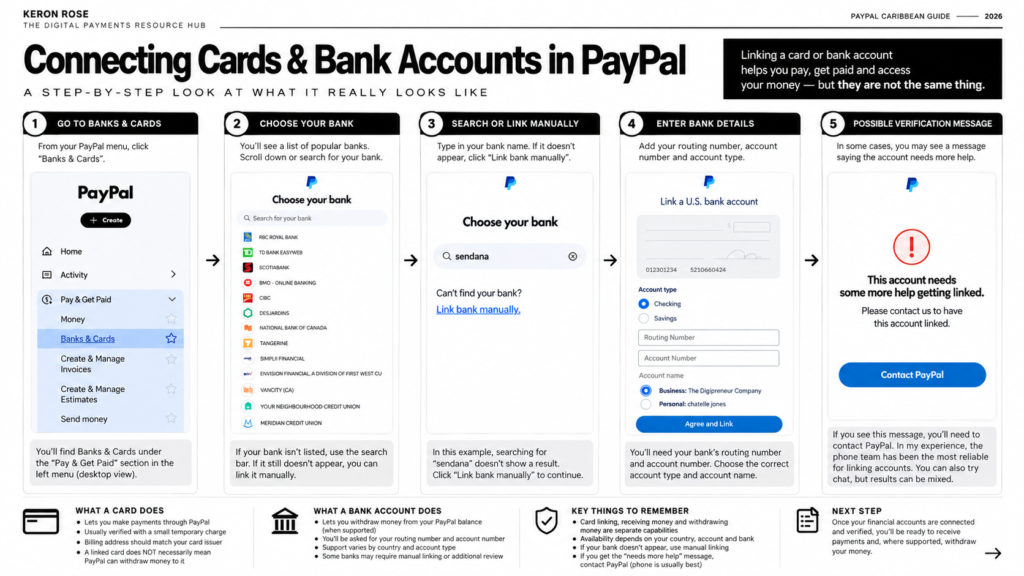
Keep in mind, WAM, Sendana, Wise, Charles Schwab…all of them give you bank accounts to connect, and every services except fo WAM, gives you a visa debit card that you SHOULD connect to the cards section. The Visa Debit cards give you the ability to use them online with PayPal to make purchases.
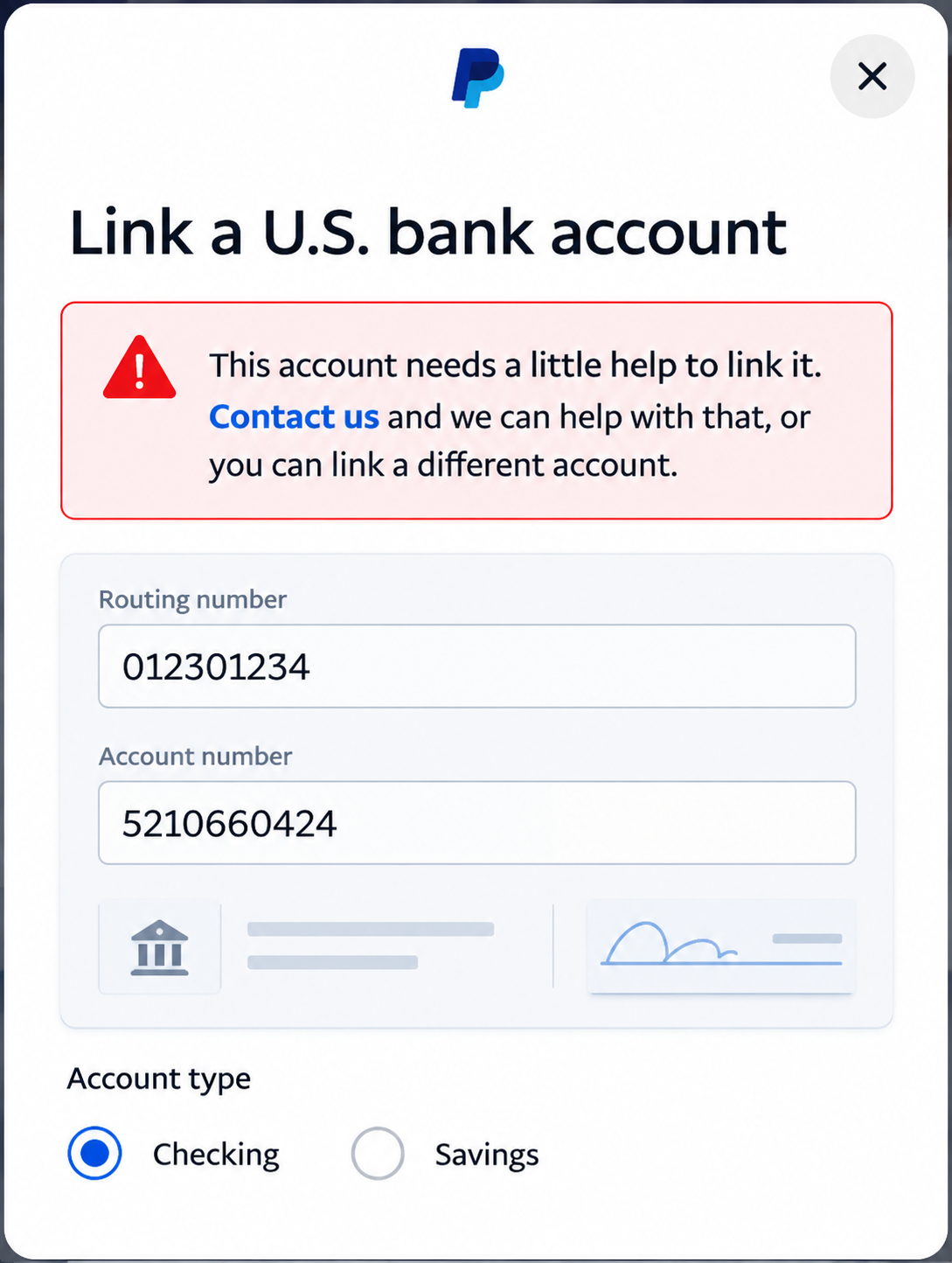
What Happens If PayPal Cannot Complete the Link?
Sometimes the account information can be entered correctly and PayPal will still display a message indicating that additional help is needed to complete the connection.
If that happens, follow PayPal’s support instructions.
In my own experience, calling PayPal support has been the most reliable way to resolve bank-linking issues. The phone support team has generally been more effective for me than trying to solve these particular issues through chat.
A linked account and a withdrawal-eligible account are not necessarily the same thing.
Do not assume that a bank or card will support PayPal withdrawals simply because it can be linked successfully.
And do not assume that because a particular bank works with PayPal in one Caribbean country, the same relationship exists in another.
Always check what PayPal actually allows your specific account to do with the financial account you have connected.
Now Let’s Make Some Money
Once your PayPal account is set up properly, the next question is simple:
How do you actually get paid?
PayPal gives you several ways to collect money, and the best method depends on how your business operates, what you are selling and how you want the customer to pay.
You do not need to use every option.
The goal is to choose the payment method that best fits the transaction.
1. Direct PayPal Payments
A direct PayPal payment is the simplest option.
If the person paying you already uses PayPal, they can send money directly to the email address connected to your PayPal account.
This works well when:
- The payer already uses PayPal
- You do not need a formal invoice
- You do not need a website checkout
- The payment is simple and straightforward
For example, if a client already knows exactly what they owe you and simply needs to send the payment, a direct PayPal payment may be enough.
For more structured business transactions, however, I generally prefer using tools such as invoices or Payment Links because they create a clearer payment experience.
2. PayPal Invoices
PayPal Invoices are one of the most useful tools on the platform for freelancers, consultants, agencies, creators and service businesses.
Instead of simply telling a client to send money to your PayPal account, you can create a professional invoice that clearly shows what they are paying for.
The basic process looks like this:
Create invoice → Add client → Add product or service → Choose currency → Send → Client pays → Track payment
When creating an invoice, you can add information such as:
- Customer name or email
- Products or services
- Quantity
- Hours
- Pricing
- Currency
- Discounts
- Shipping where relevant
- Notes
- Payment terms
You can then send the invoice directly to the customer and monitor its status from your PayPal Business account.
For service businesses, this creates a much cleaner process.
Instead of sending a message saying:
“Send US$500 to my PayPal.”
You can send the client an invoice showing exactly what the payment is for, the amount due and the currency being charged.
That becomes especially useful when you work with international clients and want to maintain a more professional billing process.
Create invoice → Send → Client pays → Track
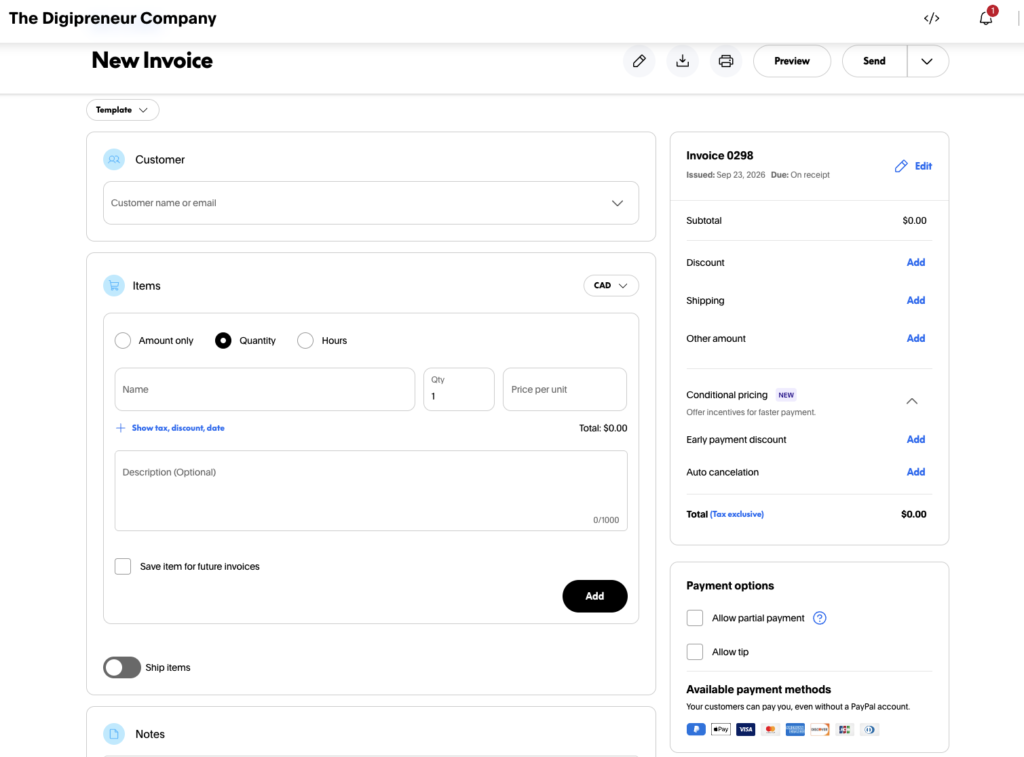
Depending on eligibility and the checkout experience PayPal presents, customers may also be offered the option to pay using a card without having their own PayPal account.
That can be valuable because the customer does not necessarily need to become a PayPal user simply to pay your invoice.
3. PayPal Payment Links
Payment Links give you another simple way to collect money without building a full online store or sending a formal invoice.
You create a payment offer inside PayPal, generate a link and then share that link with the customer.
The process is straightforward:
Create offer → Generate Payment Link → Share → Customer pays
You can share the link through:
- Social media
- Direct messages
- Your website
- Landing pages
Payment Links can be particularly useful for:
- Consultants
- Creators
- Events
- Service businesses
- Small businesses
- Businesses without a full website
For example, if you are promoting a workshop through Instagram or WhatsApp, you could send customers directly to a PayPal Payment Link rather than building a complete e-commerce checkout system.
This is also why I would focus on PayPal’s current Payment Links product rather than building your payment strategy around older PayPal.Me-style education.
4. Website Payments
If you sell directly through your website, PayPal can become part of the checkout experience.
The basic flow looks like this:
Customer → Website → PayPal Checkout → Payment → Your PayPal account
Instead of manually sending an invoice or payment link every time someone wants to buy, your website can handle the transaction automatically.
This is useful for businesses selling:
- Physical products
- Digital products
- Courses
- Event tickets
- Services
- Other online offers
PayPal can also work with supported e-commerce platforms and commerce environments such as WooCommerce, Shopify and other website systems.
For an e-commerce business, this is where PayPal becomes more than a payment app.
It becomes part of the infrastructure behind your online store.
5. Recurring Payments
Some businesses do not get paid once.
They get paid repeatedly.
That includes businesses offering:
- Memberships
- Subscriptions
- Retainers
- Recurring services
- Ongoing access to products or content
Where supported, PayPal can be used for recurring billing so the customer does not have to manually make the same payment every month.
For example, if you charge a client US$300 every month for an ongoing service, recurring-payment functionality may create a smoother experience for both you and the customer.
The exact features available can depend on your PayPal account, country and the product you are using, so always confirm what recurring-payment options are available to you.
The important point is that PayPal gives you several different ways to get paid.
You are not limited to simply giving someone your PayPal email address.
You can choose the payment experience that best fits the way your business actually sells.
Which PayPal Payment Method Should You Use?
You do not need to use every PayPal payment method.
Start with the option that best matches how you are getting paid.
| If you… | Start with… |
|---|---|
| Freelance or consult | PayPal Invoice |
| Need someone to pay quickly | Payment Link |
| Sell through your website | PayPal Checkout |
| Sell physical or digital products | E-commerce integration |
| Bill customers repeatedly | Recurring Payments |
| Simply need payment from another PayPal user | Direct PayPal payment |
You do not have to choose one method forever.
A business can use different PayPal payment methods for different types of transactions.
For example, you might use invoices for consulting clients, Payment Links for a workshop, PayPal Checkout on your website and recurring payments for a subscription or retainer.
The goal is to match the payment method to the way the customer is buying.
Not Sure Which One Fits?
Use the PayPal Payment Concierge below.
Answer a few quick questions about how you sell, and it will point you toward the PayPal payment method that makes the most sense to start with.
08 — PAYPAL PAYMENT METHOD CONCIERGE
Which PayPal Payment Method Should You Use?
Answer a few quick questions about how you get paid and I’ll point you toward the PayPal payment method that makes the most sense to start with.
QUESTION 01
What best describes how you need to get paid?
Choose the option that most closely matches the transaction.
QUESTION 02
Do you need to show the client exactly what they’re paying for?
Think about whether you need a formal payment request with services, quantities, pricing or payment terms.
QUESTION 03
Do you want a link you can send directly to the customer?
For example, something you can send through WhatsApp, email, social media or a direct message.
QUESTION 02
Should customers complete the purchase directly through your website?
Think about whether you need PayPal integrated into the actual online buying experience.
QUESTION 02
Do you need customers to be charged repeatedly?
This could include subscriptions, memberships, retainers or another ongoing payment arrangement.
QUESTION 03
Do you need a formal record of each payment request?
If each job, month or project needs its own description and amount, an invoice may make more sense.
QUESTION 02
How do you want the customer to pay?
Choose the experience that makes the most sense for this payment.
YOUR RECOMMENDED STARTING POINT
PayPal Invoice
Best for freelancers, consultants and professional service businesses.
WHY THIS FITS
Based on your answers, this payment method best matches the way you work with customers.
HOW IT WORKS
Create → Send → Customer Pays → PayPal
This is a starting recommendation. You can use more than one PayPal payment method as your business grows or your transactions change.
PayPal Fees: Understand the Cost Before You Get Paid
PayPal fees are not one universal number.
What you pay can depend on the type of transaction, the country your account is registered in, where the customer is located, the currency being used and how you eventually move the money out of PayPal.
Commercial-Payment Fees
When you receive payment for goods or services, PayPal can charge a commercial transaction fee.
The exact rate can vary by market and transaction type, so the fee you see quoted for a US PayPal account should not automatically be assumed to apply to your Caribbean account.
Cross-Border Payments
International payments can be priced differently from domestic transactions.
If your customer is paying you from another country, cross-border pricing may apply depending on the markets involved and the type of payment.
Currency Conversion
If PayPal converts one currency into another, the exchange rate used can include a currency-conversion fee above PayPal’s base exchange rate.
This means the PayPal rate may not be the same as the mid-market exchange rate you see quoted on Google or another currency service.
Transfers and Withdrawals
Moving money out of PayPal can also involve costs.
The fee can depend on the transfer method, destination account, country, currency and whether conversion is involved.
Some transfer routes may be free, while others may charge a fee for faster access.
Refunds and Disputes
Refunds, reversals and disputes can also affect the overall cost of using PayPal.
Do not calculate your PayPal costs based only on the fee charged when the original payment arrives.
Don’t assume the US PayPal fee you found on Google applies to your Caribbean account.
Always check the fee schedule for your own PayPal market and the specific transaction you are making.
Last fee check: September 2026
Official PayPal fee information:
PayPal Business Fees:
https://www.paypal.com/bt/business/paypal-business-fees
PayPal User Agreement / Fees and Currency Conversion:
https://www.paypal.com/tt/legalhub/paypal/useragreement-full
PayPal’s current business-fee documentation also explains that currency conversion fees can vary by transaction type and market, which is why readers should check the live fee schedule that applies to their own account rather than relying on a generic US rate.
Understanding Currencies and PayPal Conversion
A consultant in Trinidad & Tobago can invoice a client in the United States for US$1,000 and receive that payment in USD.
The fact that the consultant lives in Trinidad does not automatically mean that the payment needs to become TTD the moment it arrives.
To understand what happens next, it helps to separate four different ideas: the currency the customer pays in, the currency held inside PayPal, the currency used when the money is transferred out, and any conversion that happens between those stages.
Payment Currency
The payment currency is the currency used for the transaction.
If you create an invoice for US$1,000, then USD is the payment currency.
Your customer may be in the United States, Canada, the United Kingdom or somewhere else, but the invoice itself determines the currency you are asking to be paid in.
For Caribbean businesses working internationally, this is important because your pricing does not necessarily have to be tied to your domestic currency.
PayPal Balance Currency
The PayPal balance currency is the currency in which money is held inside your PayPal account.
PayPal supports multiple currencies, although the exact functionality available can depend on your country and account.
If you receive USD and your PayPal account supports holding that currency, the money may remain in USD inside PayPal rather than immediately being converted into your local currency.
This is different from where you physically live.
Withdrawal Currency
The withdrawal currency is the currency involved when money leaves PayPal and moves to another eligible financial account.
That could depend on:
- The financial account you are transferring to
- The currencies that account can receive
- The transfer method PayPal makes available
- Your PayPal account and country
- Whether a currency conversion is required
For example, transferring USD to an eligible USD account is different from transferring money to an account that ultimately needs to receive another currency.
Currency Conversion
Currency conversion happens when money needs to move from one currency into another.
For example:
You receive USD into PayPal.
If you later move that money through a route that requires another currency, a conversion may take place.
That conversion can happen at different points depending on the transaction.
The important thing is not to assume that receiving USD automatically means PayPal will immediately convert it into your domestic Caribbean currency.
PayPal’s Exchange Rate vs the Mid-Market Rate
When you search for an exchange rate online, you will often see what is commonly referred to as the mid-market exchange rate.
That is useful as a reference point, but it is not necessarily the rate PayPal will use when PayPal performs a currency conversion.
PayPal’s transaction exchange rate can include an applicable currency-conversion fee above its base exchange rate. As a result, the amount you receive after a PayPal conversion may be different from what you would calculate using the mid-market rate you see on Google or another currency service.
This is why it is worth checking the actual exchange rate and conversion information PayPal shows you before confirming a transaction.
The practical lesson is simple:
Know what currency you are being paid in, what currency you are holding, and whether a conversion is actually necessary before you move the money.
Getting Paid Is Only Half the Job
You created the invoice.
Your client paid.
The money is sitting in PayPal.
Now what?
This is where PayPal becomes more complicated for many Caribbean users.
Opening a PayPal account, receiving payments, linking a card, linking a bank account and successfully moving money out of PayPal are all separate capabilities.
Just because you can create a PayPal account does not automatically mean every withdrawal method will be available to you.
Just because you can receive a payment does not automatically mean you can transfer that money to any bank account or card you choose.
And just because a card or financial account can be linked to PayPal does not automatically mean it can be used to receive withdrawals.
That distinction matters enormously in the Caribbean because PayPal does not offer exactly the same functionality in every country.
Your available options can depend on:
- The country your PayPal account is registered in
- The type of PayPal account you have
- The financial account you are trying to connect
- The currency involved
- The withdrawal method PayPal makes available
- The eligibility rules that apply to your account
This is why asking “Does PayPal work in the Caribbean?” is too broad.
A better set of questions is:
Can I open a PayPal account?
Can I receive payments?
Can I link my card or bank account?
Can I transfer money out of PayPal?
Which transfer methods are actually available to me?
Those are not the same question.
For Caribbean entrepreneurs, freelancers and businesses, getting paid is only one half of the process.
The other half is building the financial infrastructure that allows you to actually access, move and use the money once it arrives.
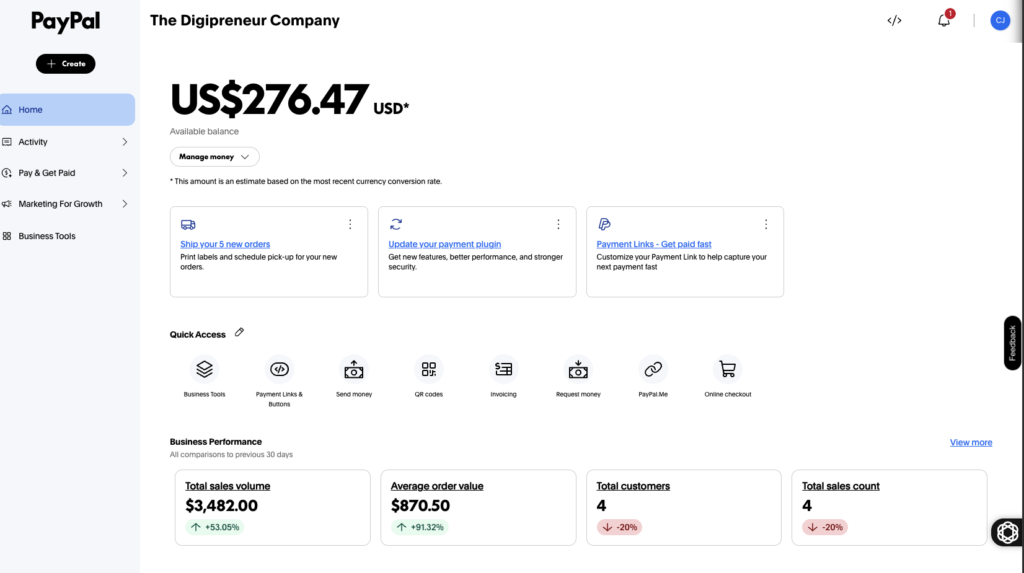
A Real PayPal Transfer: US$276.47 From PayPal to Wise
Rather than simply telling you how this works, here is an actual transfer from my PayPal Business account in September 2026.
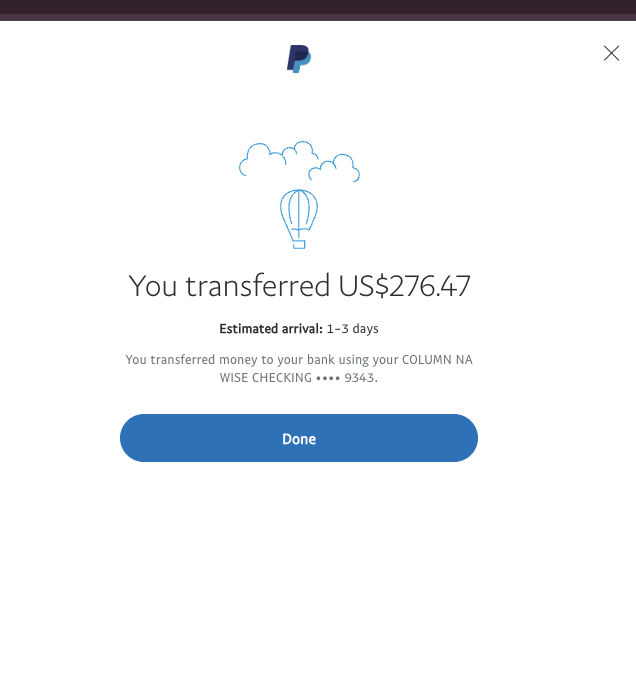
I had US$276.47 available in my PayPal balance and transferred the full amount to my linked Wise checking account.
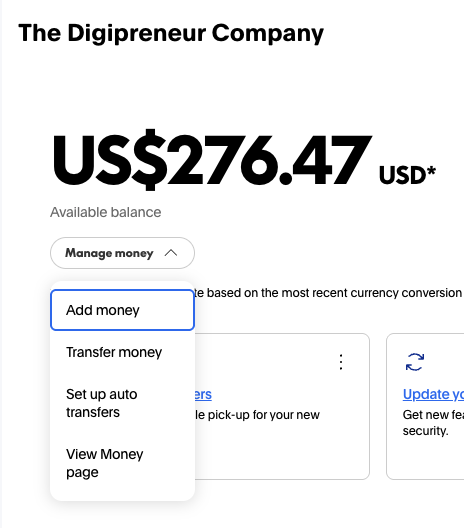
Step 1 — Start the Transfer
From the PayPal dashboard, open Manage Money and choose Transfer money.
Step 2 — Review the Transfer Options PayPal Gives You
Once you begin the transfer, PayPal shows the transfer methods currently available to your account.
For this transaction, PayPal showed:
- US$276.47 available
- A bank-transfer option
- 1–5 days displayed for the bank transfer
- No fee displayed
- My linked Wise checking account
- The full US$276.47 due to arrive
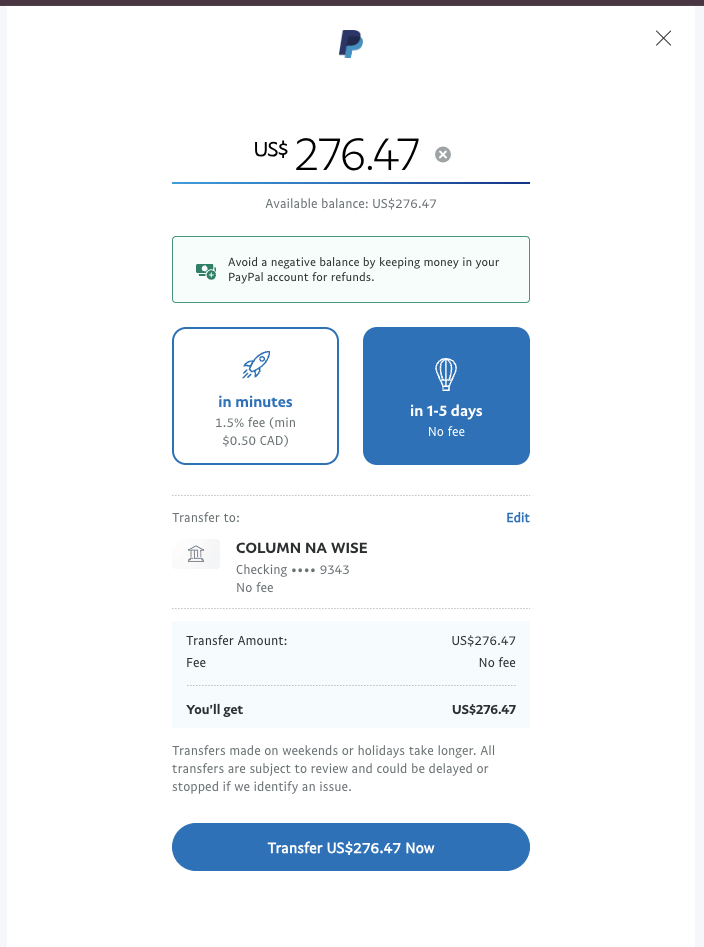
These are the options PayPal presented for my account and this transfer.
Fees, transfer speeds and available methods can differ depending on your PayPal account, country, destination account and the type of transfer being made.
Step 3 — Compare the Instant Debit-Card Option
My account also displayed an instant debit-card transfer option.
For this transaction, PayPal showed:
- In minutes
- 1.5% fee
- Minimum C$0.50
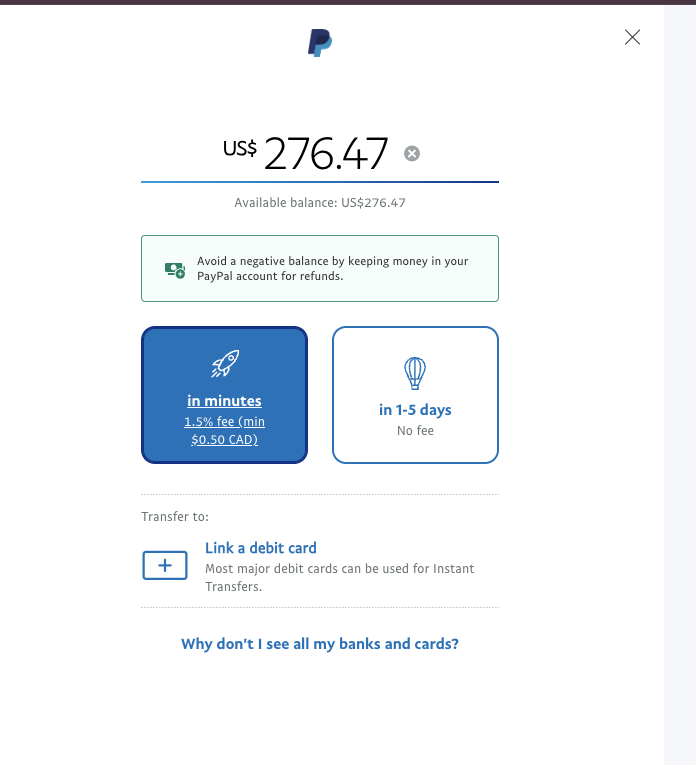
This is an example from my own PayPal account.
Do not assume this is a universal Caribbean PayPal fee.
The instant-transfer fee, minimum charge, eligible cards and transfer speed shown to you may differ depending on your account and market.
Step 4 — Complete the Transfer
I selected the bank-transfer route and transferred the full US$276.47 to my linked Wise checking account.
PayPal then confirmed the transfer and showed an estimated arrival time of 1–3 days.
This is why throughout this guide I distinguish receiving money from accessing money.
The client paying you is one transaction.
Getting that money from PayPal into the financial infrastructure you actually use is another.
PayPal Availability Is Not the Same Everywhere
One of the biggest mistakes Caribbean users make is assuming that PayPal works exactly the same way in every country.
It does not.
When someone asks:
“Does PayPal work in Jamaica?”
they may actually be asking several different questions:
- Can I create a PayPal account?
- Can I receive payments?
- Can I hold money in my PayPal balance?
- Can I link a debit or credit card?
- Can I withdraw money to that card?
- Can I connect a bank account?
- Can I receive payments in USD?
- Can I transfer the money somewhere else afterward?
Those are different capabilities.
A country can support PayPal accounts and receiving payments without necessarily offering the same withdrawal methods available in another country. Even when PayPal supports withdrawals, the eligible cards, banks, currencies, fees and transfer methods can vary.
Trinidad & Tobago
PayPal officially supports receiving payments for users in Trinidad & Tobago, and Trinidad & Tobago is included in PayPal’s current Receive Funds and Automatic Transfer framework.
Under that framework, PayPal describes transfers to an eligible US bank account or Visa credit card, subject to the requirements and functionality available to the account. PayPal
This is particularly relevant to the workflows I use because some of the international financial accounts discussed later in this guide provide US banking details that can potentially be connected to PayPal.
However, you should not interpret this to mean that every Trinidad & Tobago bank account or every Visa card will automatically work for withdrawals.
PayPal itself advises users to check the withdrawal methods actually displayed inside their account.
Jamaica
PayPal’s current developer documentation lists Jamaica with send, receive and withdraw functionality. PayPal Developer
That tells us that PayPal supports more than simply sending payments from Jamaica.
It does not, however, mean that every Jamaican bank or card can automatically be connected for withdrawals.
If you are in Jamaica, check the transfer options PayPal displays inside your account before building your payment setup around a particular bank or card.
Barbados
Barbados is also included in PayPal’s current Receive Funds and Automatic Transfer framework.
PayPal’s documentation describes receiving payments and transferring available balances to an eligible US bank account or Visa credit card under that programme. PayPal
As with Trinidad & Tobago, this should not be interpreted as confirmation that every locally issued card or domestic bank account supports PayPal withdrawals.
The specific financial account still needs to be eligible for the function you want to use.
Guyana
Guyana appears in PayPal’s current Payouts documentation as an eligible market for receiving USD payouts. PayPal’s documentation for that programme states that recipients in the listed Latin American markets can withdraw their balance in local currency to their bank. PayPal Developer
That is useful evidence that PayPal payment functionality exists for Guyanese users, but it should not be stretched into a blanket statement that every Guyanese bank account supports every PayPal feature.
Always confirm the withdrawal options available inside your individual account.
Bahamas
PayPal’s current documentation lists the Bahamas with send, receive and withdraw functionality. PayPal Developer
Again, the important distinction is between the broad capability to withdraw and the specific financial account you want to use.
The fact that PayPal supports withdrawals in the Bahamas does not automatically tell you that a particular Bahamian bank or card will appear as an eligible withdrawal destination.
Eastern Caribbean
There is no single PayPal rule that applies to the entire Eastern Caribbean.
Countries need to be checked individually.
PayPal’s current Receive Funds and Automatic Transfer agreement specifically includes markets such as:
- Antigua & Barbuda
- Dominica
- Grenada
- Saint Kitts & Nevis
- Saint Lucia
PayPal also identifies other Caribbean markets separately within its payout and country-support documentation. PayPal
This is why I would not simply say:
“PayPal works in the Eastern Caribbean.”
That statement is too broad to be useful.
The better approach is to identify your country and then confirm four things:
- Can you receive payments?
- Can you hold the balance?
- Which financial accounts can you connect?
- Which of those accounts can actually receive a transfer from PayPal?
Always Check What Your Account Actually Allows
PayPal itself notes that withdrawal to a bank account or card may not be available in every market, and eligible cards are shown to users on the withdrawal page.
So even when a guide, forum post or another Caribbean PayPal user tells you that a particular method works, check the options inside your own account before relying on it.
PayPal availability is country-specific. Withdrawal eligibility is account-specific. And a financial account being successfully linked does not automatically mean it can receive PayPal withdrawals.
The Tools I Use to Build Around PayPal
PayPal is only one part of the payment stack.
The bigger question is what happens after the money reaches PayPal.
The four tools below can all play a role in receiving funds from PayPal, but they do not all give you the same end result.
Some allow you to receive PayPal funds and keep access to those funds in USD through a Visa debit card.
Others are better suited to moving the money into a local bank account.
Sendana
Role: Receive PayPal Funds and Keep Access to USD
Sendana can be connected to PayPal so that funds can be transferred from PayPal into your Sendana account.
The major advantage is what happens after the transfer.
Sendana offers both virtual and physical Visa debit cards, which means that when PayPal funds are deposited into Sendana, you can keep access to those funds in USD rather than immediately converting them into local currency.
The workflow is:
PayPal → Sendana → Keep funds in USD → Access with virtual or physical Visa debit card
For Caribbean professionals who earn internationally, this can be extremely useful because the money can remain part of your USD financial infrastructure after leaving PayPal.
Read my complete Sendana guide →
https://keronrose.com/how-caribbean-professionals-can-access-usd-accounts-with-sendana/
Charles Schwab
Role: Receive · Hold · Spend · Invest USD
Charles Schwab can also be used as a destination for funds transferred from PayPal, where your account and country are eligible.
I have personally used Charles Schwab from Trinidad & Tobago.
Once funds leave PayPal and arrive in Schwab, they become part of a much broader USD financial setup.
Schwab provides access to a Visa debit card, allowing you to access and spend those funds while also giving you the ability to hold USD and use Schwab’s investment infrastructure.
The workflow is:
PayPal → Charles Schwab → Hold USD · Spend with Visa · Invest
Schwab is not available to residents of every Caribbean country, so eligibility needs to be checked before applying.
Read my Charles Schwab guide →
https://keronrose.com/why-caribbean-entrepreneurs-need-charles-schwab/
Wise
Role: Receive · Hold · Spend · Manage USD
Wise can also be connected to PayPal where you legitimately have access to the required Wise account details.
This is the exact type of setup shown earlier in this guide when I transferred US$276.47 from PayPal into my Wise account.
Once the funds reach Wise, they can remain within your international currency account instead of automatically becoming local Caribbean currency.
Wise also offers virtual and physical Visa debit cards to eligible users, giving you direct access to the money after it leaves PayPal.
The workflow is:
PayPal → Wise → Keep USD · Spend with Visa · Manage the funds
Wise availability and account features depend on your country of residence, so you should only use this route if you are legitimately eligible for the necessary Wise functionality.
Read my Wise guide →
https://keronrose.com/setting-up-a-wise-account-in-the-caribbean/
Wam
Role: Receive PayPal Funds and Deposit Them Into a Trinidad & Tobago Bank Account
Wam plays a different role.
You can connect Wam to PayPal and transfer your PayPal funds into Wam.
From there, the funds can be deposited into your local Trinidad & Tobago bank account.
The workflow is:
PayPal → Wam → Local Trinidad & Tobago bank account
That makes Wam useful for someone whose goal is simply to move money from PayPal into the local banking system.
The key difference is that Wam does not give you the same USD-access model as Sendana, Wise or Charles Schwab.
There is no Visa debit-card layer for keeping and directly spending the PayPal funds in USD.
If your goal is to access the money locally, Wam can provide that route.
If your goal is to preserve access to the funds as part of a USD financial setup, Sendana, Wise or Charles Schwab play a different role.
Read my Wam guide →
https://keronrose.com/how-to-convert-ttd-to-usd-euros-spend-it/
The Difference Comes Down to What Happens After PayPal
The easiest way to think about these four tools is this:
Wam:
PayPal → Wam → Trinidad & Tobago bank account
Sendana:
PayPal → Sendana → Keep USD → Access with Visa debit card
Wise:
PayPal → Wise → Keep USD → Access with Visa debit card
Charles Schwab:
PayPal → Schwab → Keep USD → Access with Visa debit card → Invest
They should not be ranked as though they are identical services.
The better question is:
What do you want to happen to your money after it leaves PayPal?
Which Payment Setup Makes Sense for You?
By this point, the question is no longer “Which payment platform is best?”
It is:
What do I need to happen after the customer pays me?
I Just Need International Clients to Pay Me
Start with the simplest setup:
PayPal Business + Invoices + Payment Links
You do not need a complicated financial stack if your main goal is simply to invoice clients and collect payments professionally.
I Can Receive Money but I’m Not Sure How to Access It
Go into PayPal and check the transfer options currently available to your account.
Look at what PayPal actually shows you for:
- Bank transfers
- Eligible cards
- Fees
- Transfer speeds
- Available destinations
Then decide what additional financial infrastructure, if any, you actually need.
I Want to Keep My Earnings in USD
Your priority is not simply withdrawing the money.
Your priority is keeping it inside financial infrastructure that allows you to continue holding and accessing USD.
That is when options such as Sendana, Wise or Charles Schwab become relevant, depending on your eligibility.
I Want the Money in My Trinidad & Tobago Bank Account
Your objective is different.
You are looking for a route that gets the PayPal funds into the local banking system.
That is where Wam can fit into the setup.
I Want More Than Just a PayPal Withdrawal Route
If your goal includes holding USD, spending internationally, managing currencies or investing, then you are no longer solving a PayPal problem.
You are building broader financial infrastructure.
That is when it makes sense to evaluate the tools covered in the previous section based on the role you actually need them to perform.
Keep the Stack as Simple as Possible
Do not add financial accounts simply because they are available.
Start with the outcome you need, then add only the tools required to achieve it.
The best payment stack is not the one with the most platforms. It is the one where every platform has a clear job.
What This Looks Like in the Real World
The easiest way to understand the payment stack is to see how it works in practice.
Freelancer
You complete the work and send the client a PayPal invoice.
International Client
→ PayPal Invoice
→ PayPal
→ Eligible Financial Infrastructure
→ Spend / Transfer / Withdraw
The important part is that PayPal handles the payment, while the financial account you connect determines what you can do with the money afterward.
Consultant
A consultant may use either a formal invoice or a faster Payment Link depending on the situation.
Client
→ PayPal Invoice or Payment Link
→ PayPal
→ Appropriate Supporting Financial Account
That supporting account could be chosen based on whether the goal is to keep the funds in USD, access them through a debit card, move them elsewhere or deposit them into a local bank account.
E-Commerce Business
For an e-commerce business, the payment experience happens directly through the website.
Customer
→ Website
→ PayPal Checkout
→ PayPal
→ Business Financial Stack
The customer completes the purchase through the website, PayPal processes the payment, and the business then moves or manages the funds through the financial infrastructure connected to its PayPal account.
The pattern is the same in every case:
Customer pays → PayPal processes the payment → Your financial stack determines what happens next.
Common PayPal Mistakes
PayPal can work extremely well as part of a Caribbean payment stack, but a few common mistakes can create unnecessary fees, account problems or access issues.
1. Using Friends & Family to Disguise Commercial Payments
If someone is paying you for a product, service, freelance job or business transaction, do not try to disguise that payment as Friends & Family simply to avoid commercial fees.
Business payments should be treated as business payments.
Using the wrong payment type can create problems if the transaction is reviewed, disputed or limited later.
Also, Friends & Family is NOT an option that can be used when sending money from Caribbean-based accounts.
2. Assuming a Linked Card Can Automatically Receive Withdrawals
A card being successfully linked to PayPal does not automatically mean PayPal can transfer money to it (ie Mastercard, Discover Card).
A card may work perfectly well as a funding source for purchases while still being unavailable as a withdrawal destination.
Always check the actual transfer options PayPal displays inside your account.
3. Ignoring Currency-Conversion Costs
Receiving money in one currency and eventually converting it into another can introduce additional costs.
Pay attention to:
- The currency you invoice in
- The currency you receive
- The currency you hold
- The currency required by your withdrawal destination
- The exchange rate PayPal is offering
A transaction that looks inexpensive at first can become more expensive once currency conversion is involved.
4. Using Mismatched Names or Account Information
Your PayPal information should match the financial accounts you are trying to connect.
Differences in names, addresses or other account information can create verification problems or prevent a financial account from being linked successfully.
Use accurate information and keep your financial records consistent.
5. Failing to Secure the Account Properly
Your PayPal account sits directly inside your financial infrastructure.
Treat it accordingly.
Use:
- A strong, unique password
- Two-factor authentication or available passkey options
- Security alerts
- A secure email account
- Trusted devices wherever possible
If someone gains control of your PayPal account, they may also gain access to the payment methods and financial accounts connected to it.
6. Assuming Something That Works in Trinidad Also Works in Jamaica
Caribbean countries do not all have identical PayPal functionality.
A withdrawal method available in Trinidad & Tobago may not be available in Jamaica, Barbados, Guyana or another Caribbean market.
The same principle applies in reverse.
Always check the options available for your country and your account.
7. Building Your Entire Financial Life Around One Platform
PayPal is useful, but it should not necessarily be your entire financial system.
Platforms can change fees, eligibility rules, transfer methods, verification requirements and account functionality.
That is one reason I prefer thinking in terms of a payment stack rather than a single payment platform.
The objective is to build enough flexibility that one account problem, policy change or service disruption does not completely stop your ability to get paid or access your money.
Explore the Digital Payments Resource Hub →
PayPal is an important part of your payment infrastructure, but it should not be the only tool in your stack.
Depending on how you get paid, where you live, how you need to access your money and what you are building, you may also need tools such as Sendana, Payoneer, Wam, WiPay, Charles Schwab or Stripe.
I created the Digital Payments Resource Hub to help Caribbean users understand how these different platforms fit together.
Inside the hub, you’ll find:
- A breakdown of the major payment and financial tools available to Caribbean users
- What each platform does and where it fits into your payment stack
- Different ways to receive, hold, move, access and spend your money
- An interactive Caribbean Payment Stack Builder to help identify which tools may make sense for your needs
- Links to my complete guides to help you go deeper and start setting up each platform
The objective isn’t to find one platform that does everything. It’s to build the financial infrastructure that gives you more ways to participate in the global economy.
GET PAID → HOLD → MOVE → ACCESS → SPEND
Explore the Digital Payments Resource Hub:
https://keronrose.com/digital-payments-resource-hub/
Written & Tested by Keron Rose
I have spent years personally testing digital-payment platforms, international financial tools and cross-border payment workflows as a Caribbean digital entrepreneur.
This guide combines official platform documentation with payment methods and financial workflows I have personally used.
The goal is to give Caribbean entrepreneurs, freelancers, creators and small businesses a practical understanding of how PayPal fits into a broader international payment system.
Originally researched: September 2026
Last reviewed: September 2026
Next review: March 2027
Platform availability, fees, transfer methods and financial-service eligibility can change.
Always verify current eligibility, features and pricing directly with the provider before opening an account, connecting a financial service or building your payment infrastructure around a particular workflow.